Pong Classic Arcade Game
Reviews
Pong Classic Arcade Game captures the essence of the original arcade Pong perfectly. The minimalist graphics and responsive controls make it easy to pick up and play. The two-player local multiplayer mode provides endless competitive fun for friends and family. It is a great way to enjoy a classic game without any distractions.
Description
Game Introduction
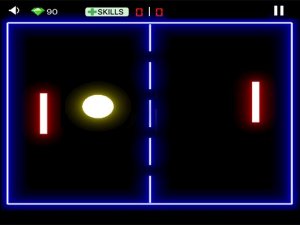
Pong Classic Arcade Game is a browser-based version of the original arcade Pong. Two players compete on opposite sides of the screen, each controlling a paddle to hit a ball past their opponent. The game features minimalist design and straightforward rules, making it accessible for all ages. Whether you are revisiting a nostalgic favorite or trying it for the first time, this game offers pure, competitive fun. It emphasizes quick reflexes and strategic positioning, providing a challenge for friends and family. With clean graphics and responsive controls, it stays true to the original while being optimized for modern web play.
How to Play
To start playing, simply open the game in your browser. Two players take control of the paddles. Player 1 typically uses keyboard keys to move their paddle up and down, while Player 2 uses a different set of keys. The ball automatically begins moving, and the objective is to hit the ball past your opponent's paddle to score a point. The game continues until one player reaches the winning score. Success depends on anticipating the ball's trajectory and positioning your paddle accordingly. Quick reactions and precise movements are essential to outplay your opponent. The simple controls let you jump right in and start playing immediately.
Game Features
Two-player local multiplayer mode. Classic arcade gameplay with simple keyboard controls. Clean, minimalist graphics for focused play. Responsive controls for precise paddle movement. Endless replayability with a friend or family member.
Tips for Success
To improve your game, practice anticipating the ball's direction and move your paddle early. Stay centered when possible to react quickly to both high and low shots. Watch your opponent's paddle position to predict their moves. Play regularly to sharpen your reflexes and timing. Communication with your opponent can make matches more enjoyable and competitive.